
Are you using an iPhone?
And suddenly your contacts got deleted or disappeared from your device? Don’t worry — you can get them back with a simple trick. Yes, you don’t need to install any third-party app or spend money for this. All you have to do is go to your device settings, turn one toggle off, and then turn it back on. Within a few moments, all your contacts will reappear. Let’s see how…
How does this trick work?
Actually, the contacts you save on your iPhone are automatically stored in iCloud. Sometimes, due to syncing issues or changes in settings, these contacts may not appear on your device. In such cases, you can refresh the iCloud contact sync. This not only helps fix syncing issues but also brings back deleted or missing contacts to your device. Let’s go through the step-by-step process.
How to Restore Deleted Contacts on iPhone?
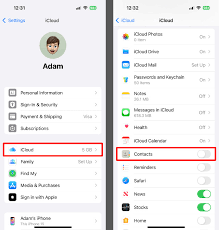
- First, open the Settings app on your iPhone.
- Tap on your Apple ID profile shown at the top.
- Select the iCloud option.
- Go to Save to iCloud or iCloud Contacts section.
- Now, turn the Contacts toggle off. Wait for a few seconds, then turn it back on.
- Within moments, your contacts will start syncing back and will reappear on your iPhone.
⚠️ Note: This trick will only work if your contacts were already backed up in iCloud. If iCloud backup was turned off earlier, this method won’t work for your phone.
![How to Earn Money from Facebook [₹30,000 to ₹40,000] – Learn 10 Easy Ways](https://weplayr.com/wp-content/uploads/2025/08/How-to-Make-Money-on-Facebook-300x200.jpg)